Springboot学习笔记4-thymeleaf thymeleaf模板引擎的使用
在早期开发的时候,我们完成的都是静态页面也就是html页面,随着时间轴的发展,慢慢的引入了jsp页面,当在后端服务查询到数据之后可以转发到jsp页面,可以轻松的使用jsp页面来实现数据的显示及交互,jsp有非常强大的功能,但是,在使用springboot的时候,整个项目是以jar包的方式运行而不是war包,而且还嵌入了tomcat容器,因此,在默认情况下是不支持jsp页面的。如果直接以纯静态页面的方式会给我们的开发带来很大的麻烦,springboot推荐使用模板引擎。
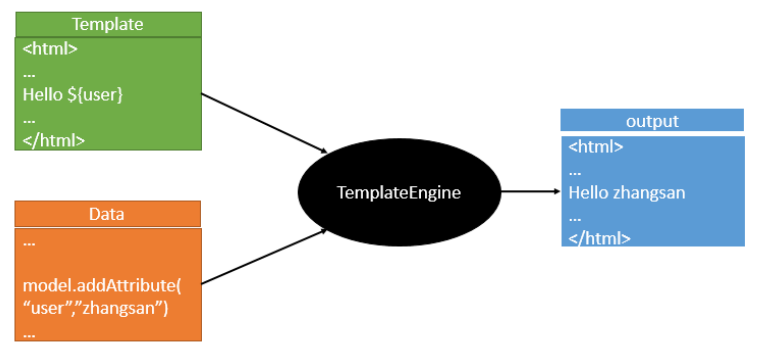
模板引擎有很多种,jsp,freemarker,thymeleaf,模板引擎的作用就是我们来写一个页面模板,比如有些值呢,是动态的,我们写一些表达式。而这些值,从哪来呢,我们来组装一些数据,我们把这些数据找到。然后把这个模板和这个数据交给我们模板引擎,模板引擎按照我们这个数据帮你把这表达式解析、填充到我们指定的位置,然后把这个数据最终生成一个我们想要的内容给我们写出去,这就是我们这个模板引擎,不管是jsp还是其他模板引擎,都是这个思想。只不过不同的模板引擎语法不同而已,下面重点学习下springboot推荐使用的thymeleaf模板引擎,语法简单且功能强大
1、thymeleaf的介绍 官网地址:https://www.thymeleaf.org/
thymeleaf在github的地址:https://github.com/thymeleaf/thymeleaf
中文网站:https://raledong.gitbooks.io/using-thymeleaf/content/
导入依赖:
1 2 3 4 5 6 7 8 9 <dependency > <groupId > org.thymeleaf</groupId > <artifactId > thymeleaf-spring5</artifactId > </dependency > <dependency > <groupId > org.thymeleaf.extras</groupId > <artifactId > thymeleaf-extras-java8time</artifactId > </dependency >
在springboot中有专门的thymeleaf配置类:ThymeleafProperties
1
2
3
4
5
6
7
8
9
10
11
12
13
14
15
16
17
18
19
20
21
22
23
24
25
26
27
28
29
30
31
32
33
@ConfigurationProperties(prefix = "spring.thymeleaf") public class ThymeleafProperties { private static final Charset DEFAULT_ENCODING = StandardCharsets.UTF_8; public static final String DEFAULT_PREFIX = "classpath:/templates/" ; public static final String DEFAULT_SUFFIX = ".html" ; private boolean checkTemplate = true ; private boolean checkTemplateLocation = true ; private String prefix = DEFAULT_PREFIX; private String suffix = DEFAULT_SUFFIX; private String mode = "HTML" ; private Charset encoding = DEFAULT_ENCODING; private boolean cache = true ;
2、thymeleaf使用模板 在java代码中写入如下代码:
1
2
3
4
5
6
@RequestMapping("/hello") public String hello (Model model) { model.addAttribute("msg" ,"Hello" ); return "hello" ; }
html页面中写入如下代码:
1
2
3
4
5
6
7
<!DOCTYPE html > <html lang ="en" xmlns:th ="http://www.thymeleaf.org" > <body > <h1 > Hello</h1 > <div th:text ="${msg}" > </div > </body > </html >
3、thymeleaf的表达式语法 1 2 3 4 5 6 7 8 9 10 11 12 13 14 15 16 17 18 19 20 21 22 23 24 25 26 27 28 29 30 Simple expressions: Variable Expressions: ${...} Selection Variable Expressions: *{...} Message Expressions: Link URL Expressions: @{...} Fragment Expressions: ~{...} Literals Text literals: 'one text' , 'Another one!' ,… Number literals: 0 , 34 , 3.0 , 12.3 ,… Boolean literals: true , false Null literal: null Literal tokens: one, sometext, main,… Text operations: String concatenation: + Literal substitutions: |The name is ${name}| Arithmetic operations: Binary operators: +, -, *, /, % Minus sign (unary operator): - Boolean operations: Binary operators: and, or Boolean negation (unary operator): !, not Comparisons and equality: Comparators: >, <, >=, <= (gt, lt, ge, le) Equality operators: ==, != (eq, ne) Conditional operators: If-then: (if) ? (then) If-then-else: (if) ? (then) : (else) Default: (value) ?: (defaultvalue) Special tokens: No-Operation: _
指令:
Thymeleaf崇尚模板是纯正的html代码,脱离模板引擎,在纯静态环境也可以直接运行。现在如果我们直接在html中编写 ${}这样的表达式,显然在静态环境下就会出错,这不符合Thymeleaf的理念。
Thymeleaf中所有的表达式都需要写在"指令"中,指令是HTML5中的自定义属性,在Thymeleaf中所有指令都是以th:开头。因为表达式${user.name}是写在自定义属性中,因此在静态环境下,表达式的内容会被当做是普通字符串,浏览器会自动忽略这些指令,这样就不会报错了。
如果我们不经过SpringMVC,而是直接用浏览器打开编写的页面:在静态环境下,th指令不会被识别,但是也不会报错,而是显示标签的缺省默认值:“请跟我来”
指令的设计,正是Thymeleaf的高明之处,也是它优于其它模板引擎的原因。动静结合的设计,使得无论是前端开发人员还是后端开发人员可以完美契合。
向下兼容
但是要注意,如果浏览器不支持Html5怎么办?
如果不支持这种th:的命名空间写法,那么可以把th:text换成 data-th-text,Thymeleaf也可以兼容。
变量_ognl表达式的语法糖
刚才获取变量值,我们使用的是经典的对象.属性名方式。但有些情况下,我们的属性名可能本身也是变量,怎么办?
ognl提供了类似js的语法方式:
例如:${user.name} 可以写作${user['name']}
4、thymeleaf实例演示 1、th的常用属性值 一、th:text :设置当前元素的文本内容,相同功能的还有th:utext ,两者的区别在于前者不会转义html标签,后者会。优先级不高:order=7
二、th:value :设置当前元素的value值,类似修改指定属性的还有th:src ,th:href 。优先级不高:order=6
三、th:each :遍历循环元素,和th:text或th:value一起使用。注意该属性修饰的标签位置,详细往后看。优先级很高:order=2
四、th:if :条件判断,类似的还有th:unless ,th:switch ,th:case 。优先级较高:order=3
五、th:insert :代码块引入,类似的还有th:replace ,th:include ,三者的区别较大,若使用不恰当会破坏html结构,常用于公共代码块提取的场景。优先级最高:order=1
六、th:fragment :定义代码块,方便被th:insert引用。优先级最低:order=8
七、th:object :声明变量,一般和*{}一起配合使用,达到偷懒的效果。优先级一般:order=4
八、th:attr :修改任意属性,实际开发中用的较少,因为有丰富的其他th属性帮忙,类似的还有th:attrappend,th:attrprepend。优先级一般:order=5
thymeleaf.html
1 2 3 4 5 6 7 8 9 10 11 12 13 14 15 16 17 18 19 20 21 22 23 24 25 <!DOCTYPE html > <html lang ="en" xmlns:th ="http://www.thymeleaf.org" > <head > <meta charset ="UTF-8" > <title > Title</title > </head > <body > <p th:text ="${thText}" > </p > <p th:utext ="${thUText}" > </p > <input type ="text" th:value ="${thValue}" > <div th:each ="message:${thEach}" > <p th:text ="${message}" > </p > </div > <div > <p th:text ="${message}" th:each ="message:${thEach}" > </p > </div > <p th:text ="${thIf}" th:if ="${not #strings.isEmpty(thIf)}" > </p > <div th:object ="${thObject}" > <p > name:<span th:text ="*{name}" /> </p > <p > age:<span th:text ="*{age}" /> </p > <p > gender:<span th:text ="*{gender}" /> </p > </div > </body > </html >
ThymeleafController.java
1 2 3 4 5 6 7 8 9 10 11 12 13 14 15 16 17 18 19 20 21 22 package com.mashibing.controller;import com.mashibing.entity.Person;import org.springframework.stereotype.Controller;import org.springframework.ui.ModelMap;import org.springframework.web.bind.annotation.RequestMapping;@Controller public class ThymeleafController { @RequestMapping("thymeleaf") public String thymeleaf (ModelMap map) { map.put("thText" ,"th:text设置文本内容 <b>加粗</b>" ); map.put("thUText" ,"th:utext 设置文本内容 <b>加粗</b>" ); map.put("thValue" ,"thValue 设置当前元素的value值" ); map.put("thEach" ,"Arrays.asList(\"th:each\", \"遍历列表\")" ); map.put("thIf" ,"msg is not null" ); map.put("thObject" ,new Person ("zhangsan" ,12 ,"男" )); return "thymeleaf" ; } }
2、标准表达式语法 ${…} 变量表达式,Variable Expressions
*{…} 选择变量表达式,Selection Variable Expressions
一、可以获取对象的属性和方法
二、可以使用ctx,vars,locale,request,response,session,servletContext内置对象
1 2 session.setAttribute("user" ,"zhangsan" ); th:text="${session.user}"
三、可以使用dates,numbers,strings,objects,arrays,lists,sets,maps等内置方法
standardExpression.html
1 2 3 4 5 6 7 8 9 10 11 12 13 14 15 16 17 18 19 20 21 22 23 24 25 26 27 28 29 30 31 32 33 34 35 36 37 38 39 40 41 42 43 44 45 46 47 48 49 50 51 52 53 54 55 56 57 58 59 60 61 62 63 64 65 66 67 68 69 70 71 72 73 74 75 76 77 78 79 80 <!DOCTYPE html > <html lang ="en" xmlns:th ="http://www.thymeleaf.org" > <head > <meta charset ="UTF-8" > <title > thymeleaf内置方法</title > </head > <body > <h3 > #strings </h3 > <div th:if ="${not #strings.isEmpty(Str)}" > <p > Old Str : <span th:text ="${Str}" /> </p > <p > toUpperCase : <span th:text ="${#strings.toUpperCase(Str)}" /> </p > <p > toLowerCase : <span th:text ="${#strings.toLowerCase(Str)}" /> </p > <p > equals : <span th:text ="${#strings.equals(Str, 'blog')}" /> </p > <p > equalsIgnoreCase : <span th:text ="${#strings.equalsIgnoreCase(Str, 'blog')}" /> </p > <p > indexOf : <span th:text ="${#strings.indexOf(Str, 'r')}" /> </p > <p > substring : <span th:text ="${#strings.substring(Str, 2, 4)}" /> </p > <p > replace : <span th:text ="${#strings.replace(Str, 'it', 'IT')}" /> </p > <p > startsWith : <span th:text ="${#strings.startsWith(Str, 'it')}" /> </p > <p > contains : <span th:text ="${#strings.contains(Str, 'IT')}" /> </p > </div > <h3 > #numbers </h3 > <div > <p > formatDecimal 整数部分随意,小数点后保留两位,四舍五入: <span th:text ="${#numbers.formatDecimal(Num, 0, 2)}" /> </p > <p > formatDecimal 整数部分保留五位数,小数点后保留两位,四舍五入: <span th:text ="${#numbers.formatDecimal(Num, 5, 2)}" /> </p > </div > <h3 > #bools </h3 > <div th:if ="${#bools.isTrue(Bool)}" > <p th:text ="${Bool}" > </p > </div > <h3 > #arrays </h3 > <div th:if ="${not #arrays.isEmpty(Array)}" > <p > length : <span th:text ="${#arrays.length(Array)}" /> </p > <p > contains : <span th:text ="${#arrays.contains(Array,2)}" /> </p > <p > containsAll : <span th:text ="${#arrays.containsAll(Array, Array)}" /> </p > </div > <h3 > #lists </h3 > <div th:if ="${not #lists.isEmpty(List)}" > <p > size : <span th:text ="${#lists.size(List)}" /> </p > <p > contains : <span th:text ="${#lists.contains(List, 0)}" /> </p > <p > sort : <span th:text ="${#lists.sort(List)}" /> </p > </div > <h3 > #maps </h3 > <div th:if ="${not #maps.isEmpty(hashMap)}" > <p > size : <span th:text ="${#maps.size(hashMap)}" /> </p > <p > containsKey : <span th:text ="${#maps.containsKey(hashMap, 'thName')}" /> </p > <p > containsValue : <span th:text ="${#maps.containsValue(hashMap, '#maps')}" /> </p > </div > <h3 > #dates </h3 > <div > <p > format : <span th:text ="${#dates.format(Date)}" /> </p > <p > custom format : <span th:text ="${#dates.format(Date, 'yyyy-MM-dd HH:mm:ss')}" /> </p > <p > day : <span th:text ="${#dates.day(Date)}" /> </p > <p > month : <span th:text ="${#dates.month(Date)}" /> </p > <p > monthName : <span th:text ="${#dates.monthName(Date)}" /> </p > <p > year : <span th:text ="${#dates.year(Date)}" /> </p > <p > dayOfWeekName : <span th:text ="${#dates.dayOfWeekName(Date)}" /> </p > <p > hour : <span th:text ="${#dates.hour(Date)}" /> </p > <p > minute : <span th:text ="${#dates.minute(Date)}" /> </p > <p > second : <span th:text ="${#dates.second(Date)}" /> </p > <p > createNow : <span th:text ="${#dates.createNow()}" /> </p > </div > </body > </html >
ThymeleafController.java
1 2 3 4 5 6 7 8 9 10 11 12 13 14 @RequestMapping("standardExpression") public String standardExpression (ModelMap map) { map.put("Str" , "Blog" ); map.put("Bool" , true ); map.put("Array" , new Integer []{1 ,2 ,3 ,4 }); map.put("List" , Arrays.asList(1 ,3 ,2 ,4 ,0 )); Map hashMap = new HashMap (); hashMap.put("thName" , "${#...}" ); hashMap.put("desc" , "变量表达式内置方法" ); map.put("Map" , hashMap); map.put("Date" , new Date ()); map.put("Num" , 888.888D ); return "standardExpression" ; }
@{…} 链接表达式,Link URL Expressions
1 2 3 4 5 6 7 8 9 10 11 12 13 <link th:href ="@{/webjars/bootstrap/4.0.0/css/bootstrap.css}" rel ="stylesheet" > <link th:href ="@{/main/css/123.css}" rel ="stylesheet" > <form class ="form-login" th:action ="@{/user/login}" th:method ="post" > <a class ="btn btn-sm" th:href ="@{/login.html(l='zh_CN')}" > 中文</a > <a class ="btn btn-sm" th:href ="@{/login.html(l='en_US')}" > English</a >
#{…} 消息表达式,Message Expressions
~{…} 代码块表达式,Fragment Expressions
fragment.html
1 2 3 4 5 6 7 8 9 10 11 12 13 14 15 16 17 18 19 20 21 22 23 24 25 26 27 28 29 30 31 32 33 34 35 36 37 38 39 40 41 42 43 44 45 46 47 <!DOCTYPE html > <html lang ="en" xmlns:th ="http://www.thymeleaf.org" > <head > <meta charset ="UTF-8" > <title > Title</title > </head > <body > <footer th:fragment ="copy" > 2019 The Good Thymes Virtual Grocery </footer > <div th:insert ="fragment::copy" > </div > <div th:replace ="fragment::copy" > </div > <div th:include ="fragment::copy" > </div > <div > <footer > © 2011 The Good Thymes Virtual Grocery </footer > </div > <footer > © 2011 The Good Thymes Virtual Grocery </footer > <div > © 2011 The Good Thymes Virtual Grocery </div > </body > </html >
5、国际化的配置 在很多应用场景下,我们需要实现页面的国际化,springboot对国际化有很好的支持, 下面来演示对应的效果。
1、在idea中设置统一的编码格式,file->settings->Editors->File Encoding,选择编码格式为utf-8
2、在resources资源文件下创建一个i8n的目录,创建一个login.properties的文件,还有login_zh_CN.properties,idea会自动识别国际化操作
3、创建三个不同的文件,名称分别是:login.properties,login_en_US.properties,login_zh_CN.properties
内容如下:
1 2 3 4 5 6 7 8 9 10 11 12 13 14 15 login.password =密码1 login.remmber =记住我1 login.sign =登录1 login.username =用户名1 login.password =Password login.remmber =Remember Me login.sign =Sign In login.username =Username login.password =密码~ login.remmber =记住我~ login.sign =登录~ login.username =用户名~
4、配置国际化的资源路径
1 2 3 spring: messages: basename: i18n/login
5、编写html页面
1 2 3 4 5 6 7 8 9 10 11 12 13 14 15 16 17 18 19 20 21 22 23 24 25 26 27 28 29 30 31 32 33 34 35 36 37 38 39 40 41 42 43 44 45 46 47 48 49 50 51 52 53 54 55 56 初始html页面 <!DOCTYPE html > <html lang ="en" xmlns:th ="http://www.thymeleaf.org" > <head > <meta charset ="UTF-8" /> <title > Title</title > </head > <body > <form action ="" method ="post" > <label > Username</label > <input type ="text" name ="username" placeholder ="Username" > <label > Password</label > <input type ="password" name ="password" placeholder ="Password" > <br > <br > <div > <label > <input type ="checkbox" value ="remember-me" /> Remember Me </label > </div > <br > <button type ="submit" > Sign in</button > <br > <br > <a > 中文</a > <a > English</a > </form > </body > </html > 修改后的页面 <!DOCTYPE html > <html lang ="en" xmlns:th ="http://www.thymeleaf.org" > <head > <meta charset ="UTF-8" /> <title > Title</title > </head > <body > <form action ="" method ="post" > <label th:text ="#{login.username}" > Username</label > <input type ="text" name ="username" placeholder ="Username" th:placeholder ="#{login.username}" > <label th:text ="#{login.password}" > Password</label > <input type ="password" name ="password" placeholder ="Password" th:placeholder ="#{login.password}" > <br > <br > <div > <label > <input type ="checkbox" value ="remember-me" /> [[#{login.remmber}]] </label > </div > <br > <button type ="submit" th:text ="#{login.sign}" > Sign in</button > <br > <br > <a > 中文</a > <a > English</a > </form > </body > </html >
可以看到通过浏览器的切换语言已经能够实现,想要通过超链接实现的话,如下所示:
添加WebMVCConfig.java代码
1 2 3 4 5 6 7 8 9 10 11 12 13 14 15 16 17 18 19 20 21 22 23 24 25 26 27 28 29 30 31 32 33 34 35 36 37 38 39 40 41 42 43 44 45 46 package com.mashibing.config;import org.springframework.context.annotation.Bean;import org.springframework.context.annotation.Configuration;import org.springframework.util.StringUtils;import org.springframework.web.servlet.LocaleResolver;import org.springframework.web.servlet.config.annotation.ViewControllerRegistry;import org.springframework.web.servlet.config.annotation.WebMvcConfigurer;import javax.servlet.http.HttpServletRequest;import javax.servlet.http.HttpServletResponse;import java.util.Locale;@Configuration public class WebMVCConfig implements WebMvcConfigurer { @Override public void addViewControllers (ViewControllerRegistry registry) { registry.addViewController("/" ).setViewName("login" ); registry.addViewController("/login.html" ).setViewName("login" ); } @Bean public LocaleResolver localeResolver () { return new NativeLocaleResolver (); } protected static class NativeLocaleResolver implements LocaleResolver { @Override public Locale resolveLocale (HttpServletRequest request) { String language = request.getParameter("language" ); Locale locale = Locale.getDefault(); if (!StringUtils.isEmpty(language)){ String[] split = language.split("_" ); locale = new Locale (split[0 ],split[1 ]); } return locale; } @Override public void setLocale (HttpServletRequest request, HttpServletResponse response, Locale locale) { } } }
login.html页面修改为:
1 2 3 4 5 6 7 8 9 10 11 12 13 14 15 16 17 18 19 20 21 22 23 24 25 26 <!DOCTYPE html > <html lang ="en" xmlns:th ="http://www.thymeleaf.org" > <head > <meta charset ="UTF-8" /> <title > Title</title > </head > <body > <form action ="" method ="post" > <label th:text ="#{login.username}" > Username</label > <input type ="text" name ="username" placeholder ="Username" th:placeholder ="#{login.username}" > <label th:text ="#{login.password}" > Password</label > <input type ="password" name ="password" placeholder ="Password" th:placeholder ="#{login.password}" > <br > <br > <div > <label > <input type ="checkbox" value ="remember-me" /> [[#{login.remmber}]] </label > </div > <br > <button type ="submit" th:text ="#{login.sign}" > Sign in</button > <br > <br > <a th:href ="@{/login.html(language='zh_CN')}" > 中文</a > <a th:href ="@{/login.html(language='en_US')}" > English</a > </form > </body > </html >
国际化的源码解释:
1 2 3 4 5 6 7 8 9 10 11 12 13 14 15 16 17 18 19 20 21 22 23 24 25 26 27 28 29 30 31 32 33 34 35 36 37 38 39 40 41 42 43 44 45 46 47 48 49 50 51 52 53 54 55 56 57 58 59 60 61 62 63 64 65 66 67 68 69 public class MessageSourceAutoConfiguration { private static final Resource[] NO_RESOURCES = new Resource [0 ]; public MessageSourceAutoConfiguration () { } @Bean @ConfigurationProperties(prefix = "spring.messages") public MessageSourceProperties messageSourceProperties () { return new MessageSourceProperties (); } @Bean public MessageSource messageSource (MessageSourceProperties properties) { ResourceBundleMessageSource messageSource = new ResourceBundleMessageSource (); if (StringUtils.hasText(properties.getBasename())) { messageSource.setBasenames(StringUtils.commaDelimitedListToStringArray(StringUtils.trimAllWhitespace(properties.getBasename()))); } if (properties.getEncoding() != null ) { messageSource.setDefaultEncoding(properties.getEncoding().name()); } messageSource.setFallbackToSystemLocale(properties.isFallbackToSystemLocale()); Duration cacheDuration = properties.getCacheDuration(); if (cacheDuration != null ) { messageSource.setCacheMillis(cacheDuration.toMillis()); } messageSource.setAlwaysUseMessageFormat(properties.isAlwaysUseMessageFormat()); messageSource.setUseCodeAsDefaultMessage(properties.isUseCodeAsDefaultMessage()); return messageSource; } } @Bean @ConditionalOnMissingBean @ConditionalOnProperty(prefix = "spring.mvc", name = "locale") public LocaleResolver localeResolver () { if (this .mvcProperties.getLocaleResolver() == WebMvcProperties.LocaleResolver.FIXED) { return new FixedLocaleResolver (this .mvcProperties.getLocale()); } AcceptHeaderLocaleResolver localeResolver = new AcceptHeaderLocaleResolver (); localeResolver.setDefaultLocale(this .mvcProperties.getLocale()); return localeResolver; } @Override public Locale resolveLocale (HttpServletRequest request) { Locale defaultLocale = getDefaultLocale(); if (defaultLocale != null && request.getHeader("Accept-Language" ) == null ) { return defaultLocale; } Locale requestLocale = request.getLocale(); List<Locale> supportedLocales = getSupportedLocales(); if (supportedLocales.isEmpty() || supportedLocales.contains(requestLocale)) { return requestLocale; } Locale supportedLocale = findSupportedLocale(request, supportedLocales); if (supportedLocale != null ) { return supportedLocale; } return (defaultLocale != null ? defaultLocale : requestLocale); }